
5 Star reviews on TrustPilot
 Finding the best SEO tools for beginners requires looking at your entire workflow from keyword research to technical site health. Many small business owners waste money on expensive enterprise software before they understand the basics of search engine optimization.
You need practical applications that deliver clear insights without requiring a data science degree. This guide breaks down the exact software stack you need to start ranking your website, complete with pricing and specific use cases.
Free Google tools you must install immediately
Before spending money on third-party software, you need to set up the foundational tracking systems provided by search engines. These free platforms give you direct data from the source. You cannot effectively optimize a website without knowing how users interact with your pages and how search engines view your technical setup.
Google Search Console is the most important tool in your arsenal. It shows you exactly which queries bring users to your site, your average ranking positions, and any indexing errors preventing your pages from appearing in search results. You should check this dashboard weekly to monitor your organic performance data.
According to industry guides, a beginner should start with Google Search Console and Google Analytics 4 to cover on-page issues and visitor behavior. Google Analytics 4 tracks user engagement, conversion events, and traffic sources. While it has a steep learning curve, setting it up early ensures you collect historical data. If you need help configuring these platforms, reading our SEO Tips for Small Business Websites provides a solid starting point.
Essential keyword research tools for new websites
Finding the right keywords is the foundation of any successful content strategy. Beginners often target highly competitive terms and get frustrated when they fail to rank. The right keyword research tools help you identify low-competition phrases that actually drive targeted traffic to your business.
Google Keyword Planner is the best starting point for new websites, and the price is impossible to beat: free. It's built into Google Ads, so you don't need to run an actual ad campaign to access it, just create the account. Enter a seed keyword or a competitor's URL and it returns search volume, competition level (low, medium, high), and related long-tail suggestions pulled straight from Google's own search data. The catch is that it's designed for advertisers, not SEOs, so volume ranges can be broad and it won't tell you how hard a keyword is to rank organically, only how competitive it is for ads.
Ubersuggest is another popular option that provides keyword volume, difficulty scores, and content ideas. It offers a limited free version that works well for casual bloggers. Small business owners looking for more comprehensive options can explore our list of 22 Best Free SEO Analysis Tools for Your Website to find additional keyword planners.[support.google][youtube]
Technical SEO and site crawling software
Technical SEO ensures that search engine bots can easily crawl and index your website. If your site has broken links, missing meta descriptions, or slow loading times, your content will struggle to rank regardless of its quality. You need a dedicated crawler to audit your technical health.
Screaming Frog SEO Spider is the industry standard for technical site audits. You download this desktop application and run it against your domain to uncover broken links, redirect chains, and missing page titles. The free version allows you to crawl up to 500 URLs, which is usually plenty for a new small business website. If your site grows beyond that limit, the paid version costs $259 per year for unlimited crawling. Running a crawl once a month helps you catch technical errors before they impact your search visibility.
WordPress plugins for on-page optimization
If you use WordPress to manage your website, installing an SEO plugin is mandatory. These plugins handle technical tasks like generating XML sitemaps and provide real-time feedback on your content as you write it. They make on-page optimization straightforward for users with no coding experience.
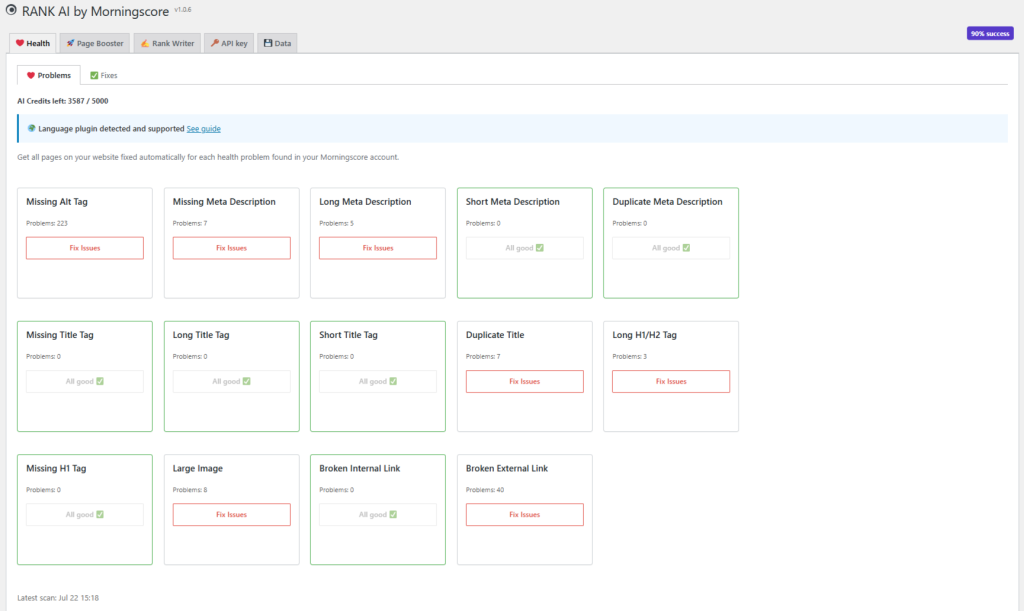
RANK AI by Morningscore takes this further than a standard checklist plugin. Instead of just telling you what's wrong, it runs a full onsite health scan and pushes automated fixes directly to your WordPress site, so you're not manually rewriting title tags at midnight. It's agentic, meaning it connects to WordPress (or Shopify), scans your issues, suggests fixes, and applies updates without you touching code.
Setup is simple: create a Morningscore account, run the health scan, upload the plugin zip file to your WordPress admin, and activate it. For beginners who don't want to babysit a checklist every time they publish, this closes the gap between "here's your SEO problem" and "here's it fixed."
All-in-one SEO suites for growing businesses
Once your website starts generating revenue and you outgrow the basic tools, you may want to invest in an all-in-one SEO tool for beginners. These platforms combine keyword research, backlink analysis, rank tracking, and competitor intelligence into a single dashboard. They are powerful but come with a higher price tag, though not always as high as you'd think.
Morningscore is widely considered one of the best SEO tools for beginners who are ready to scale their operations, largely because it doesn't bury you in enterprise-level complexity to get there. The Lite plan starts at $69 per month (or around $58 per month billed annually), covering 100 keywords, 3 websites, and 100 AI credits a month. Higher tiers scale up fast: Business at $99/month gets you 500 keywords and 10 websites, Pro at $159/month covers 2,000 keywords and 30 websites, and Premium at $299/month handles 5,000 keywords across 100 websites.
Every plan includes the full API, WordPress and Shopify plugin access, an AI writer, and AI visibility tracking for ChatGPT and Google AI Overviews, so you're not paying extra for "advanced" features locked behind a higher tier. There's a 14-day free trial with no credit card required, which matters if you just want to test the data before committing. For beginners specifically, the gamified interface (missions, XP, guided steps) teaches SEO as you go instead of just dumping raw metrics on you.[thatmarketingbuddy]
Local business SEO versus affiliate marketing tools
The tools you choose should align with your specific business model. A local plumber needs different data than an affiliate blogger reviewing software. Understanding this distinction prevents you from paying for features you will never use.
Local businesses need tools that track map pack rankings, monitor online reviews, and manage local citations. BrightLocal and Whitespark are excellent choices for local search optimization. They help you ensure your name, address, and phone number are consistent across the web. Affiliate marketers and bloggers, on the other hand, need tools focused heavily on content optimization, backlink analysis, and long-tail keyword research.
Platforms like Ahrefs or Morningscore are better suited for these global or national campaigns, especially since Morningscore now bundles GEO tracking (AI Overviews and ChatGPT citations) into the same dashboard rather than treating it as a bolt-on. If you are unsure which approach fits your business, reviewing my SEO articles can help clarify your strategy.
Adapting your tools for AI search and LLMs
Search engines are rapidly integrating artificial intelligence into their results pages. Google uses AI Overviews to answer user queries directly, which changes how we approach optimization. Your tool stack needs to account for this shift in user behavior.
Traditional keyword tracking is no longer enough. You must monitor how often your brand is cited as a source in AI-generated answers. Morningscore builds this directly into its core plans rather than treating it as a premium add-on, tracking both Google AI Overviews and ChatGPT citations so you can see your "mention share" alongside your normal rankings. But the tool only tells you where you stand; you still need to focus on creating highly authoritative, original content that AI models want to reference. This means publishing original research, expert interviews, and detailed case studies.
Your first 30 days: A beginner SEO workflow
Having the right software is useless if you do not know how to apply it. Many beginners suffer from analysis paralysis when faced with too much data. Following a structured workflow ensures you make actual progress on your website during your first month.
In week one, focus entirely on setup. Install Google Search Console, Google Analytics 4, and connect Morningscore's RANK AI plugin to your WordPress site. Verify your domain and submit your XML sitemap. In week two, use Screaming Frog to run a technical audit, then let RANK AI handle the fixes it can automate. Fix any remaining broken links and ensure every page has a unique title tag.
In week three, use Google Keyword Planner or Ubersuggest to find five low-competition keywords relevant to your business. In week four, write and publish content targeting those specific keywords, using Morningscore's tracking to see how quickly you start moving on those terms. This simple sequence builds a strong foundation without requiring expensive software.
Frequently asked questions about SEO software
New website owners frequently ask the same questions when building their optimization stack. Here are direct answers to help you make informed decisions about your software investments.
Do I need to pay for SEO tools immediately?
No. You can achieve significant organic growth using only free tools like Google Search Console, Google Keyword Planner, and the free version of Screaming Frog. You should only upgrade to paid software when you hit the limitations of the free versions or when your website generates enough revenue to justify the cost, and even then Morningscore's $69/month entry point is a lower bar than most enterprise suites.
What is the best tool for finding easy keywords?
Google Keyword Planner is a solid free option because the data comes directly from Google, but you'll need to cross-check the competition metric since it's calibrated for ad bidding, not organic difficulty. If you want a purpose-built organic difficulty score instead, that's where paid tools start to earn their keep.
Can I do SEO without any tools?
While you can write good content without tools, you cannot diagnose technical errors or track your actual performance without software like Google Search Console. Operating without basic tracking is like driving blindfolded.
Building your organic growth strategy
Selecting the best SEO tools for beginners is about matching your current budget with your immediate needs. Start with the free Google platforms including Keyword Planner, add a reliable crawler like Screaming Frog, and let Morningscore's RANK AI plugin handle onsite fixes automatically so you're not stuck doing it manually. Avoid the temptation to buy expensive enterprise suites until you have mastered the basics of content creation and technical site health.
If managing this software stack feels overwhelming, you do not have to do it alone. We offer structured SEO packages designed specifically for small businesses to drive predictable sales growth. Reach out through our contact page to discuss how we can handle the technical work while you focus on running your business.
Leave a Comment